Log retention settings#
Dell Data Processing Engine (DDPE) retains logs for completed and failed Spark jobs, Spark Connect servers, and Jupyter Notebooks for troubleshooting and auditing purposes. You can configure how long these logs are kept before they are automatically deleted.
See the official Spark documentation for more details.
Note
You must have the Spark system MANAGE privilege to
configure log retention settings.
In the UI#
Click Log retention settings in the top-right options menu of the Spark jobs pane to configure log retention:
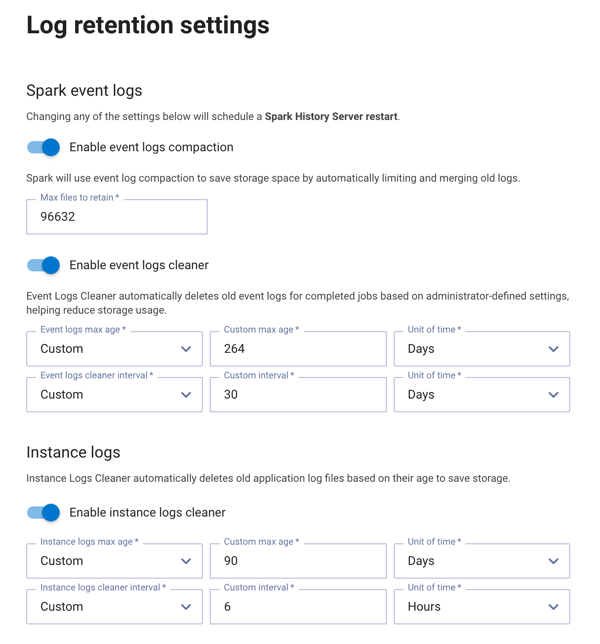
The following settings are available:
Event logs compaction#
Note
This setting applies to Spark batch jobs and Spark Connect servers.
Use the toggle to enable or disable event logs compaction. When enabled, Spark saves storage space by automatically merging old event log files.
In the Max files to retain field, enter the maximum number of event log files to retain. Files beyond this limit are compacted.
Warning
Compaction is a lossy operation. Some events are discarded during compaction and are no longer visible in the Spark History Server UI. Review the official Spark documentation for more details.
Event logs cleaner#
Note
This setting applies to Spark batch jobs and Spark Connect servers.
Use the toggle to enable or disable the event logs cleaner. When enabled, old event logs for completed jobs are automatically deleted based on the configured age and interval settings.
Configure the Event logs max age to set the maximum age of event log files before they are eligible for deletion. Select a preset or select Custom to specify a custom value and unit of time.
Configure the Event logs cleaner interval to set how frequently the cleaner runs to check for and delete old event logs. Select a preset or select Custom to specify a custom value and unit of time.
Instance logs cleaner#
Note
Applies to all instance types, including Spark batch jobs, Spark Connect servers, and Jupyter Notebooks.
Use the toggle to enable or disable the instance logs cleaner. When enabled, old instance log files are automatically deleted based on their age to save storage space.
Configure the Instance logs max age to set the maximum age of instance log files before they are eligible for deletion. Select a preset or select Custom to specify a custom value and unit of time.
Configure the Instance logs cleaner interval to set how frequently the cleaner runs to check for and delete old instance logs. Select a preset or select Custom to specify a custom value and unit of time.
Warning
Changing event logs compaction or event logs cleaner settings restarts the Spark History Server.
In the CLI#
Use the DDPE CLI to view and configure log retention settings. See the log retention CLI commands for all available commands.
View the following sections for example log retention commands:
View current settings#
To view the current log retention settings:
./dell-data-processing-engine admin log-retention get
Event logs compaction#
To enable event logs compaction and set the maximum number of files to retain:
./dell-data-processing-engine admin log-retention update \
  --spark-eventlogs-compaction-enabled true \
  --spark-eventlogs-compaction-max-files-to-retain 16
To disable event logs compaction:
./dell-data-processing-engine admin log-retention update \
  --spark-eventlogs-compaction-enabled false
Event logs cleaner#
To enable the event logs cleaner and configure its maximum age and interval:
./dell-data-processing-engine admin log-retention update \
  --spark-eventlogs-cleaner-enabled true \
  --spark-eventlogs-cleaner-max-age 7d \
  --spark-eventlogs-cleaner-interval 1d
To disable the event logs cleaner:
./dell-data-processing-engine admin log-retention update \
  --spark-eventlogs-cleaner-enabled false
Instance logs cleaner#
To enable the instance logs cleaner and configure its maximum age and interval:
./dell-data-processing-engine admin log-retention update \
  --instance-logs-cleaner-enabled true \
  --instance-logs-cleaner-max-age 30d \
  --instance-logs-cleaner-interval 1d
To disable the instance logs cleaner:
./dell-data-processing-engine admin log-retention update \
  --instance-logs-cleaner-enabled false
Reset to defaults#
To reset all log retention settings to their default values:
./dell-data-processing-engine admin log-retention reset